Motion
Studio Echo: a motion trail effect for one-person photos
Turn one pose into a 5-second clip where translucent motion trails repeat the movement in rhythm.
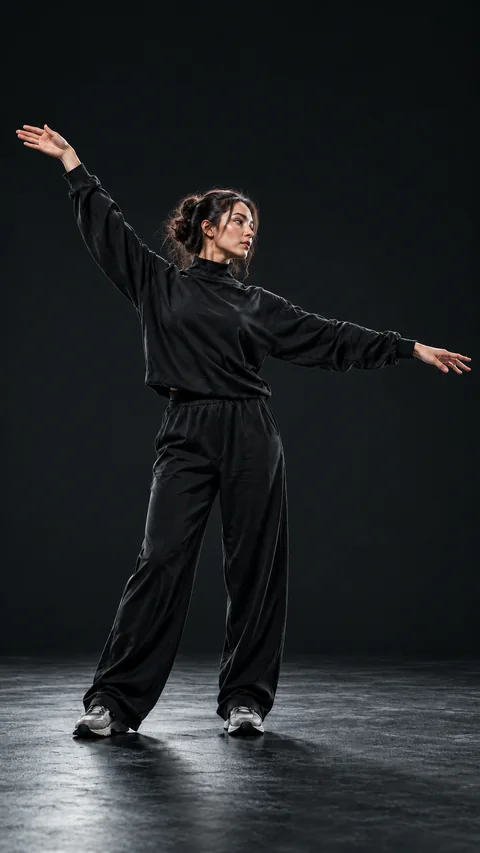
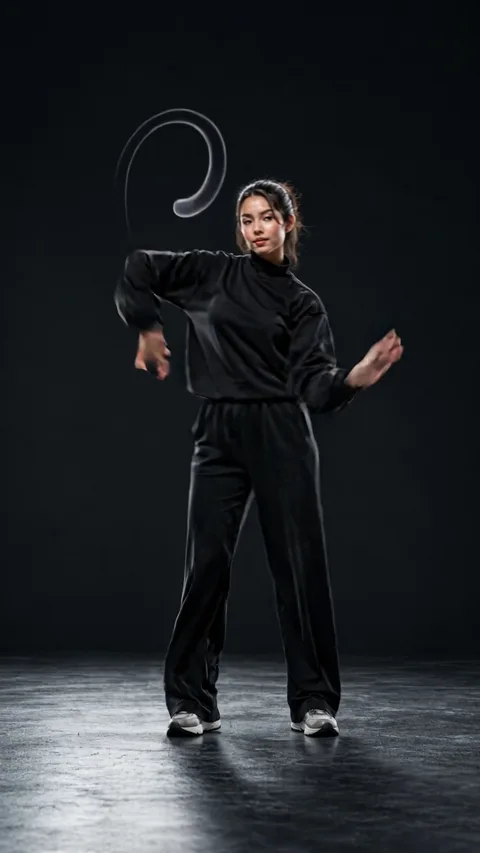
Sample generated from the photo on the left.
Loading effects
Photo tips for Studio Echo
Use one clearly visible person in a simple studio-like setting.
How to use Studio Echo
Choose a clear pose
Pick a photo where one person holds a readable pose from head to feet.
Keep the setting plain
Use a simple studio-like background so the repeats stay clean.
Generate and download
Choose your photo, review the credit cost, and generate after signing in. Review the finished result before downloading or sharing it.
Generation runs per request for signed-in accounts and is charged in credits; a run the provider confirms as failed is refunded automatically.
Studio Echo: ideas, results and limitations
Studio Echo turns a photo of one person into a five-second AI video with rhythmic movement and repeated motion trails. It is intended for a clear pose in a simple setting, where the moving silhouette can stay easy to read.
What the motion trail effect does
Starting from a photo of one person in a simple setting, the effect asks the model for a short, playful pose while translucent echoes of that same pose repeat in rhythm behind them. The camera stays steady, identity and outfit are meant to stay the same, and no text or logos are requested. The trails come from one photo, so they are generated copies of the movement rather than a long exposure or a composite of several shots.
Studio Echo at a glance
Upload one JPEG or PNG of up to 10 MB. One run returns one 5-second video without sound and currently costs 128 credits; the page shows that cost again before you generate.
Compare all Zorvel AI video effects and photo filters to see how Studio Echo differs from the others. Credits for a run come from Zorvel credit packs and plans.
Where this effect fits
Choose one person with a distinct pose and enough space around the body. A simple studio-like background makes the motion trails easier to distinguish. Overlapping people, patterned scenery and a tightly cropped body can make the repeated forms difficult to separate.
Understanding the generated sample
The displayed output was generated from the paired source image. Watch the rhythm of the pose and the way the motion trails follow it. Your own photo supplies a different silhouette, so the pattern, spacing and timing will not exactly match the example.
What can vary in your result
The repeated forms are a generated visual effect rather than separately photographed people. Limbs, faces and clothing details can drift as the model adds movement. Review the clip before using it where exact body shape or identity consistency is important.
Studio Echo: common questions
Do I need several photos for the repeated figures?
No. This effect uses one image of one person. The model generates the movement and repeated motion-trail appearance from that starting picture.
Does Studio Echo provide music or audio production?
No. Here Studio Echo is the name of a visual photo-to-video effect. It is not a recording studio, a music tool or an audio echo processor.
Can I choose the exact number of motion trails?
The current page provides a fixed effect rather than a timeline editor. The count, spacing and motion of the repeated forms are interpreted by the model and can vary.
Transformation
Transformation